Deploying machine learning models is rarely about model performance alone.
In practice, the hardest part of ML engineering is ensuring that a model runs reliably across environments — from a developer’s laptop to staging and production.
This is where Docker becomes essential.
The Problem with "It Works on My Machine"
Machine learning systems tend to accumulate complexity quickly:
- Specific Python versions
- Native system dependencies
- CUDA drivers for GPU inference
- Model artifacts and checkpoints
- Environment variables and runtime configuration
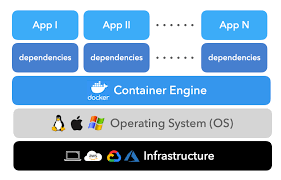
Without isolation, even small differences between environments can lead to failures that are difficult to debug. Docker solves this by packaging the model, code, and dependencies into a single, reproducible unit.
Why Docker for ML Systems
Docker provides three critical guarantees for ML deployment:
- Consistency — the same environment everywhere
- Portability — deployable across machines and platforms
- Reproducibility — predictable behavior over time
For production ML systems, these guarantees are more important than convenience.
A Production-Ready Dockerfile for ML Services
Below is a practical Dockerfile for serving ML models (e.g., PyTorch or FastAPI-based inference services):
FROM python:3.9-slim

# Install system dependencies
RUN apt-get update && apt-get install -y \
    gcc \
    && rm -rf /var/lib/apt/lists/*

# Set working directory
WORKDIR /app

# Copy requirements first (better layer caching)
COPY requirements.txt .
RUN pip install --no-cache-dir -r requirements.txt

# Copy application code
COPY . .

# Create non-root user for security
RUN useradd --create-home --shell /bin/bash app
USER app

# Expose service port
EXPOSE 8000

# Health check endpoint
HEALTHCHECK --interval=30s --timeout=30s --start-period=5s --retries=3 \
    CMD curl -f http://localhost:8000/health || exit 1

# Start the application
CMD ["uvicorn", "main:app", "--host", "0.0.0.0", "--port", "8000"]
This setup ensures:
- Minimal base image size
- Layer caching for faster builds
- Non-root execution for better security
- Health checks for orchestration platforms
Multi-Stage Builds for Smaller Images
Multi-stage builds help reduce final image size by separating build-time dependencies from runtime requirements.
# Build stage
FROM python:3.9 as builder
WORKDIR /app
COPY requirements.txt .
RUN pip install --user -r requirements.txt

# Production stage
FROM python:3.9-slim
WORKDIR /app
COPY --from=builder /root/.local /root/.local
COPY . .
ENV PATH=/root/.local/bin:$PATH

CMD ["python", "app.py"]
Benefits of this approach:
- Smaller production images
- Reduced attack surface
- Faster deployments and rollbacks
What Docker Enables in ML Deployment
When used correctly, Docker enables:
- Predictable inference behavior
- Easier CI/CD integration
- Safer scaling and rollback strategies
- Cleaner separation between training and serving
In production, Docker becomes the foundation on which orchestration tools like Kubernetes or managed services can operate reliably.
Closing Thoughts
Machine learning models don’t fail because of algorithms — they fail because of environment drift.
Docker removes that uncertainty by making the environment explicit, versioned, and portable. For any serious ML deployment, containers are not optional — they are infrastructure.